
Other Services you might be interested in

Data migration is the process of moving data from an existing application to a new application, or to a newer version of the same system. Usually, this change happens because the current tools can’t support new business needs, reporting requirements, or growth.
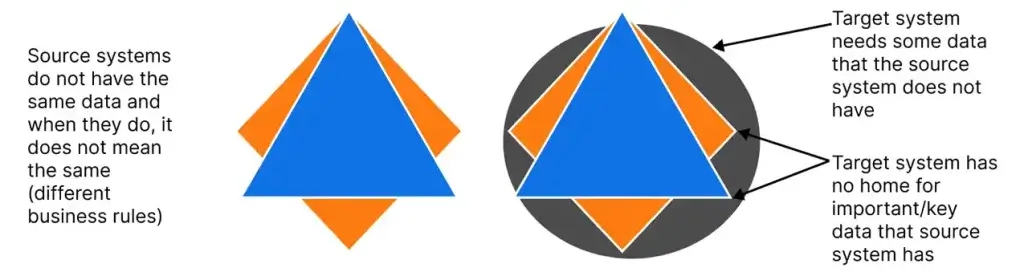
However, migration is not only a “copy and paste” task. In many cases, the old system contains valuable data that was collected over years, and some of that data may not fit neatly into the new system. At the same time, the new system may require fields, formats, or identifiers that the old system never captured.
Therefore, a good migration includes more than moving rows. It includes mapping fields, cleaning data, removing duplicates, and validating accuracy before go-live. In addition, teams often migrate historical data (for reporting) and active data (for operations) in different ways.
A typical data migration includes:
Final migration and post-go-live monitoring
The investment in a new application is only realized when the new application is usable and trusted. In other words, the new system is not fully functional if the data is missing, incomplete, or in the wrong format.
Moreover, poor migration can create costly operational problems. For example, sales may lose account history, finance may miss invoices, and support may lose ticket context. As a result, teams spend weeks fixing issues manually, and customer experience suffers.
Data migration also matters because business rules change over time. Therefore, data often needs to conform to new rules in the target system. This includes new product structures, new customer definitions, new contract logic, or updated compliance requirements.
A strong data migration helps you:
Finally, successful migrations create confidence across teams. When users trust the data in the new system, adoption increases and the new platform delivers value faster.